

Business & EntrepreneurshipHome Kitchen Costing & Orders
Know what each order really costs, and what to do today
A workbook for home bakers, sweet makers and tiffin services. Enter your ingredient prices once, and it works out the cost of every recipe, including gas, oven, packaging and your own time. Then a Today sheet shows what to deliver, what to make and what to collect.
₹449
Instant digital download after your payment is confirmed.
- Secure payment by Razorpay
- Instant download
- Refund policy
- FormatsXLSX, PDF
- Inside3 files
- LevelBeginner
- PriceOne-time, no subscription
Your order at a glance
Exactly what you're buying
- Product
- Home Kitchen Costing & Orders
- You get
- Costing and orders workbook (blank) XLSX
- Costing and orders workbook (sample) XLSX
- Quick-start guide PDF, 10 pages
- Opens in
- LibreOffice Calc 7 or later · Microsoft Excel 2016 or later, Microsoft 365 · Google Sheets · Phone or tablet
- Level
- Beginner
- Delivery
- Instant digital download after your payment is confirmed.
- Price
- ₹449 one-time
Why it exists
Sound familiar?
- I price by guessing, or by copying what others charge.
- I forget gas, packaging and my own time when I work out cost.
- Orders live in WhatsApp chats and I lose track of advances and balances.
- I'm not sure who still owes me for this month's tiffin.
- I don't know which items actually make money.
How Home Kitchen Costing & Orders helps
You fill in three things: ingredient prices (as you buy them), recipes (what goes into each batch) and your settings (gas cylinder price, oven wattage, electricity rate, an hourly rate for your time and your target margin). The workbook then shows each recipe's full cost per unit, a suggested price and a clear check such as 'Below target margin'. Orders and tiffin plans use those costs, so every order shows its balance and estimated profit, and the Today sheet pulls together today's and tomorrow's deliveries, what to make, tiffin skips and money to collect. A monthly summary adds up sales, profit, purchases and money still to collect.
It works out costs from the prices and times you enter, so the results are only as accurate as those figures. It doesn't take orders, send reminders or handle payments for you, and it can't guarantee more sales or profit.
After using it, you can
- See the full cost per unit of every recipe, including gas, oven, packaging and your time
- Get a suggested price for your target margin, and spot items priced below it
- Keep every order with its advance, later payments and balance
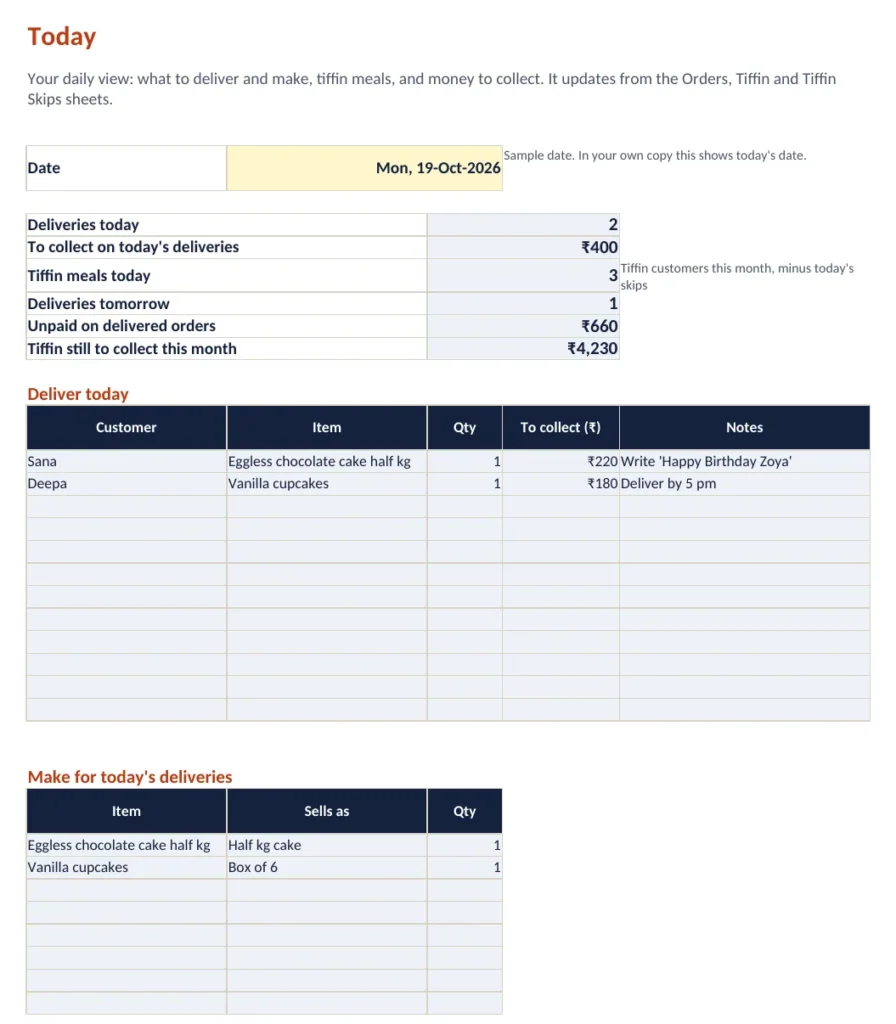
- Open one Today sheet to see deliveries, what to make and money to collect
- Bill monthly tiffin customers, with skipped meals taken off automatically
- Plan a big order with the Batch Planner's ingredient shopping list
- See each month's sales, profit, purchases and money still to collect
What's included
3 deliverables, described honestly
-
XLSX
Costing and orders workbook (blank)
Twelve sheets: Start Here, Today, Orders, Tiffin, Tiffin Skips, Purchases, Recipes, Recipe Items, Ingredients, Batch Planner, Monthly Summary and Settings. Room for 120 ingredients, 60 recipes, 600 orders, 400 tiffin rows, 1,000 skips and 1,000 purchases. Dropdowns, colour-coded input cells and automatic checks.
- Helps you
- Cost and price your items, track orders, tiffin billing and spending, and see each day's work in one place.
- How to use
- Save a copy, fill in Settings, add ingredients and recipes, then enter orders as they come in. Yellow cells are yours; the rest is calculated.
-
XLSX
Costing and orders workbook (sample)
The same workbook filled with a fictional home kitchen in Indore: 28 ingredients, 5 recipes, 10 orders, tiffin customers with skips, and purchases.
- Helps you
- See how every sheet works with realistic data before you enter your own.
- How to use
- Open it first and click around. Change a price to see the costs update.
-
PDF, 10 pages
Quick-start guide
Opening the files, the sheets in order, your first price in about 15 minutes, two worked examples, the daily routine, orders, tiffin and skips, and troubleshooting.
- Helps you
- Get set up without guesswork.
- How to use
- Read pages 1 to 4 before you start, then keep it for reference.
Preview
Look inside before you buy
Real screenshots and sample pages from the product.
Worked example
Coconut ladoo, from the fictional sample kitchen
Before
- A box of 12 is sold at ₹250, which feels like a fair price
- Cost is guessed from the coconut and condensed milk only
- Gas, the box and 45 minutes of work per batch are not counted
With the workbook
- Full cost per box comes to about ₹214, including gas, packaging, time and 5% wastage
- Profit per box is about ₹36, a 14% margin, so the check says 'Below target margin'
- For a 30% margin the suggested price is ₹310, and the owner can decide what to charge
These are the workbook's own results for the fictional sample data. Your ingredient prices, times and settings will give different figures.
After you buy
Your first steps after buying
Download and unzip
Download the file after your payment is confirmed, unzip it and save a copy of the blank workbook with your business name.
Look at the sample
Open the sample workbook to see a filled-in kitchen. The Today sheet shows what a normal day looks like.
Set up and price your first item
Fill in Settings, add the ingredients for one recipe and enter the recipe. The guide's first-price section takes about 15 minutes.
Use it every day
Add orders and payments as they happen and open the Today sheet each morning. Add more recipes when you have time.
Quality
Checked before it reached you
- 69 automated checks on the formulas passed
- Download package unzipped and checked file by file
- No macros, no login and no internet needed
Is it right for you?
Who it's for, and who it isn't
Beginner
A great fit if you are
- A home baker taking cake and dessert orders
- Someone making sweets, snacks or festival boxes to order
- A tiffin or meal service with monthly customers
- A small food business that wants to price from real costs
- Someone comfortable typing numbers into a spreadsheet
Probably not for you if
- You need an app that takes orders or payments from customers
- You want automatic WhatsApp or SMS reminders
- You need GST invoices, stock control or accounting software
- You run a restaurant with a large menu and staff
Works with
| App or device | Works? |
|---|---|
| LibreOffice Calc 7 or later | Yes, tested |
| Microsoft Excel 2016 or later, Microsoft 365 | Built only with functions Excel supports. Open the file directly. |
| Google Sheets | Upload to Google Drive, then File > Save as Google Sheets |
| Phone or tablet | Set up on a laptop or desktop. After that, the Excel or Google Sheets app can be used for quick entries; not every phone app has been tested. |
| Quick-start guide | Any PDF reader |
| Internet, add-ons, macros | None needed once downloaded. No macros, no subscription. |
Price
Get Home Kitchen Costing & Orders
- Choose your option
- Pay securely
- Download your files
Questions
About Home Kitchen Costing & Orders
Do I need paid software?
No. It works in LibreOffice Calc, which is free, and in Google Sheets with a free Google account. It also opens in Microsoft Excel 2016 or later.
Can I use it on my phone?
Set it up on a laptop or desktop, because there are many columns. After that, the Excel or Google Sheets phone app can be used to look up a price or add an order or payment. We have not tested every phone app.
Is it only for cakes?
No. Any item you make in batches works: cakes, cupcakes, sweets, snacks, pickles or meals. The tiffin sheets handle monthly meal plans.
How accurate are the costs?
The workbook does the arithmetic exactly, but it uses the prices, quantities and times you enter. Update ingredient prices when they change and the costs update everywhere.
Does it work offline?
Yes, in Excel or LibreOffice. Google Sheets needs an internet connection.
Can I change it?
Yes. Add your own ingredients, recipes, units and customers. Formula cells are kept separate from yellow input cells so you don't overwrite them by accident.
Does it create GST invoices?
No. It tracks orders, payments and profit for your own planning. It is not accounting or tax software.
The file won't open. What should I do?
Unzip the download first. Check that you have Excel 2016 or later, LibreOffice 7 or later, or use Google Sheets. If it still doesn't open, download it again or contact support.
How do I get the files?
You can download them as soon as your payment is confirmed.
What if I need help?
Contact support through the website and we'll help you get it working.
Know what each order really costs, and what to do today
Price every recipe from your real costs, then run orders, tiffin customers and payments from one Today sheet. Excel, Google Sheets or LibreOffice.
Buy now