

Content CreationAI Creator Toolkit
Turn your ideas into clear, useful content, one realistic week at a time
A spreadsheet workbook and three short PDF guides that walk you from choosing a topic to checking your finished post, with a completed example at every step. Use any AI assistant you already have, or none at all.
₹399
Instant digital download after your payment is confirmed.
- Secure payment by Razorpay
- Instant download
- Refund policy
- FormatsXLSX, PDF
- Inside4 files
- LevelBeginner to intermediate
- PriceOne-time, no subscription
Your order at a glance
Exactly what you're buying
- Product
- AI Creator Toolkit
- You get
- AI Creator Toolkit workbook XLSX
- Creator Quick Start PDF, 7 pages
- AI Workflow Guide PDF, 9 pages
- 7-Day Creator Challenge PDF, 9 pages
- Opens in
- Microsoft Excel 2016 or later, Microsoft 365 · Google Sheets · LibreOffice Calc 7 or later · PDF guides
- Level
- Beginner to intermediate
- Delivery
- Instant digital download after your payment is confirmed.
- Price
- ₹399 one-time
Why it exists
Sound familiar?
- I want to create content but I never know what to post.
- My scripts and captions sound stiff or copied.
- AI tools confuse me, or give me generic answers.
- I start strong, then can't keep posting consistently.
- I can't afford a content team or expensive software.
- I'm never sure whether my content is actually good.
How AI Creator Toolkit helps
The toolkit gives you a simple process: choose a direction, plan at a pace you can keep, write an honest opening, build a short script, adapt one idea into several formats, use an AI assistant carefully, check your work, and learn from it each week. Every tool sits next to a completed example, so you can see what 'done' looks like before you start.
It won't make anything go viral, and it can't promise views, followers or income. How much time it saves depends on how you work.
After using it, you can
- Choose a content direction that fits your interests, knowledge and time
- Plan 30 days at 2, 3, 5 or 7 publishing days a week
- Write openings from 102 hook examples, each with a completed version
- Build a short-video script using 21 frameworks with full examples
- Turn one idea into seven formats without copying the same text
- Check every piece with a 10-question quality checklist
What you lose by waiting
Why start today
A blank page costs the most time. The toolkit gives you a direction, hooks and scripts to start from.
The Quick Start takes about 10 minutes and ends with a rough first draft.
Each week you plan, write and check in one workbook, instead of starting from scratch every time.
What's included
4 deliverables, described honestly
-
XLSX
AI Creator Toolkit workbook
The main workbook: 10 tool sheets plus a frameworks sheet. Content Direction, 30-Day Planner, Hook Library (102 hooks in 10 categories), Script Builder with 21 script frameworks, Caption Toolkit (9 templates), One Idea Seven Outputs, AI Workflows (11 reusable instructions), Quality Checklist and Weekly Reflection.
- Helps you
- Plan, write, adapt and check your content in one place, beside a completed example.
- How to use
- Open it in Excel, Google Sheets or LibreOffice. Light-yellow cells are yours to fill in; rows marked SAMPLE are examples.
-
PDF, 7 pages
Creator Quick Start
A short guide to making your first draft, with a full worked example.
- Helps you
- Get from a blank page to a rough first draft in about 10 to 20 minutes.
- How to use
- Read it first, with the workbook open beside it.
-
PDF, 9 pages
AI Workflow Guide
How to use any AI chat assistant you already have, carefully and privately.
- Helps you
- Get useful drafts from AI without handing over your judgement or personal data.
- How to use
- Use it with the AI Workflows sheet. Any assistant works, including free plans. No API key needed.
-
PDF, 9 pages
7-Day Creator Challenge
One small task a day for a week, with a completed example for each day.
- Helps you
- Build a habit with small, manageable steps in your first week.
- How to use
- Optional. Follow one day at a time, at your own pace.
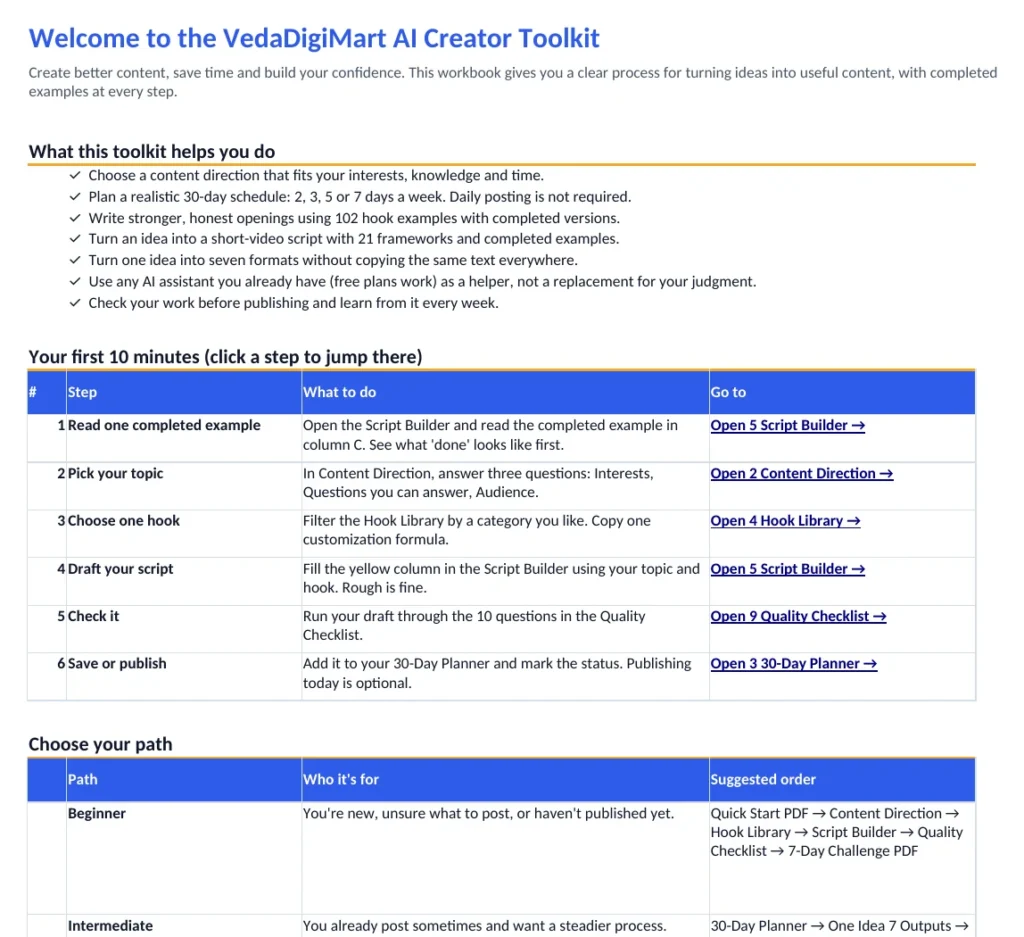
Preview
Look inside before you buy
Real screenshots and sample pages from the product.
After you buy
Your first win, step by step
Download and save a copy
Download the files after your payment is confirmed, and save a blank copy of the workbook so you can reuse it later.
Open the workbook
Excel: double-click the file and click Enable Editing if asked. Google Sheets: upload the .xlsx to Drive, open it with Google Sheets, then use File, Make a copy.
Read the Quick Start
It takes about 10 minutes and leads you to a rough first draft using the Start Here sheet.
Plan, write and check
Use the planner, hooks, script builder and quality checklist each week, and the Weekly Reflection sheet to learn from what you made.
Your first win
You finish the Quick Start with a rough first draft of your first piece of content.
Is it right for you?
Who it's for, and who it isn't
Beginner to intermediate
A great fit if you are
- A beginner who wants to start creating content
- A student sharing educational content
- An aspiring Instagram or YouTube creator
- A professional building a personal brand
- A freelancer, teacher or coach explaining your expertise
- A small creator without a content team
Probably not for you if
- You want guaranteed views, followers or income
- You need software that posts or schedules for you (the workbook doesn't connect to any platform)
- You want analytics from your social accounts
- You need professional health, money or legal advice for your content
Works with
| App or device | Works? |
|---|---|
| Microsoft Excel 2016 or later, Microsoft 365 | Yes, designed for it |
| Google Sheets | Yes, after importing the .xlsx |
| LibreOffice Calc 7 or later | Yes, tested |
| PDF guides | Any PDF reader on phone, tablet or computer |
| Phone | Fine for reading the PDFs and viewing the workbook; filling it in is easier on a laptop or desktop |
| AI assistant | Optional. Any chat assistant; free plans are enough |
Price
Get AI Creator Toolkit
- Choose your option
- Pay securely
- Download your files
Questions
About AI Creator Toolkit
Do I need to pay for an AI tool?
No. The AI parts are optional and work with any chat assistant you already use, including free plans. You don't need an API key.
Will this make my content go viral?
No, and nothing honest can promise that. The toolkit gives you a clearer process and practical skills. Results depend on your topic, your effort and your audience.
Does it post or schedule content for me?
No. It's a planning and writing workbook. It doesn't connect to Instagram, YouTube or any analytics.
Can I use it on my phone?
You can read the PDFs and view the workbook on a phone. Filling in the workbook is much easier on a laptop or desktop.
Why do some cells look blank in a file previewer?
Formula results appear once the file is opened in a spreadsheet app such as Excel, Google Sheets or LibreOffice. Some quick previewers don't calculate formulas.
Can I share the files with friends?
Your purchase is for your personal use, so please don't resell or redistribute the files. Anything you create using the toolkit is yours.
Turn your ideas into clear, useful content, one realistic week at a time
Turn your ideas into clear, honest content, with completed examples at every step.
Buy now